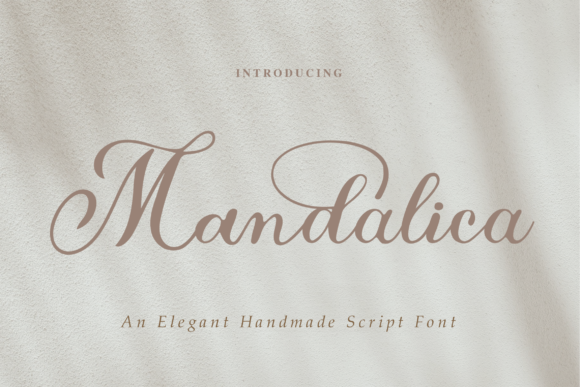
Mandalica Script: Elevating Design with Elegant Calligraphy
When it comes to adding a touch of elegance and sophistication to your design projects, Mandalica Script stands out as a remarkable choice. This delicate calligraphy typeface is not just another font; it's an artistic expression that can transform the visual appeal of any text-based content. Whether you're designing logos, creating branding materials, or crafting invitations, Mandalica Script brings a sense of luxury and refinement that few other fonts can match.
Mandalica Script is PUA encoded, which means you have easy access to all its amazing glyphs and ligatures. This feature allows for greater flexibility in your design work, enabling you to create unique and visually striking compositions without the need for complex software or additional tools.
Why Choose Mandalica Script?
There are several compelling reasons why designers and creators choose Mandalica Script for their projects:
- Elegance and Sophistication: The graceful curves and intricate details of Mandalica Script make it ideal for high-end designs that demand a sense of class and exclusivity.
- Versatility: While primarily a calligraphy font, Mandalica Script can be used across various mediums—from print to digital—making it a versatile option for different types of projects.
- Accessibility: Being PUA encoded ensures that users can easily access and utilize all the special characters and ligatures, enhancing the creative possibilities without unnecessary complexity.
Common Mistakes When Using Mandalica Script
Despite its many benefits, there are some common mistakes that users often make when incorporating Mandalica Script into their designs. These errors can affect the overall quality and effectiveness of the final product.
Mistake 1: Overusing the Font
One of the most frequent mistakes is using Mandalica Script too frequently within a single design. While it's beautiful, overuse can lead to visual clutter and reduce readability. It’s best to use it sparingly, such as for headings or accents, rather than for large blocks of text.
Better Approach: Reserve Mandalica Script for titles, taglines, or short phrases where its elegance can shine without overwhelming the reader.
Mistake 2: Ignoring Readability
Another common error is prioritizing aesthetics over readability. Mandalica Script, like many calligraphy fonts, can be challenging to read in long paragraphs. Using it for extended text may confuse readers and detract from the message being conveyed.
Better Approach: Pair Mandalica Script with a more legible sans-serif or serif font for body text. This combination maintains the luxurious feel while ensuring clarity and ease of reading.
Mistake 3: Not Checking Compatibility
Some users might overlook checking if Mandalica Script is compatible with their design software or platforms. Incompatibility issues can result in distorted text or missing glyphs, which can be frustrating and time-consuming to fix.
Better Approach: Always verify that the font works well with your preferred design tools before committing to a project. Testing the font on different devices and platforms can also help ensure consistent results.
What to Check Before Using Mandalica Script
Before deciding to use Mandalica Script in your design projects, consider the following factors:
- Purpose of the Design: Determine whether the font aligns with the tone and message of your project. Mandalica Script is best suited for formal or luxurious contexts.
- Target Audience: Consider who will be viewing your design. If your audience prefers modern or minimalist styles, a calligraphy font might not be the best fit.
- Platform Compatibility: Ensure that the font is supported by the platforms and devices where your design will be displayed.
- Licensing: Make sure you understand the licensing terms associated with Mandalica Script. Some fonts require specific permissions for commercial use.
Maximizing the Potential of Mandalica Script
To fully leverage the potential of Mandalica Script, take the time to explore its features and experiment with different applications. Here are a few ideas to get started:
- Branding Materials: Use Mandalica Script for logos, business cards, or packaging to convey a sense of luxury and professionalism.
- Wedding Invitations: The elegant appearance of Mandalica Script makes it perfect for creating romantic and sophisticated wedding invitations.
- Product Packaging: Incorporate Mandalica Script into product labels or packaging to enhance the perceived value and appeal of your products.
By thoughtfully integrating Mandalica Script into your design workflow, you can elevate the visual impact of your projects while maintaining a balance between beauty and functionality.
Remember, the key to successful design lies in understanding the strengths and limitations of each tool at your disposal. With Mandalica Script, you have a powerful asset that can add a touch of elegance to your creations when used wisely and appropriately.