Belostika Script: A Delicate Touch for Every Design Project
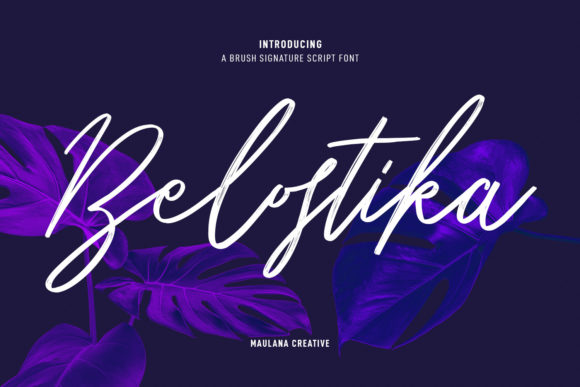
Belostika Script is a font that captures the essence of elegance and sophistication. Its delicate curves and flowing lines make it a favorite among designers looking to add a personalized and artistic flair to their work. Whether you're crafting wedding invitations, thank you cards, or branding materials, Belostika Script feels equally gorgeous and delicate, making it an ideal choice for any project that requires a customized touch.
However, while its beauty is undeniable, there are several considerations when choosing and using Belostika Script. Many users overlook important details that can affect the final outcome of their design. In this article, we'll explore common mistakes, misunderstandings, and practical advice to help you use Belostika Script effectively and avoid potential pitfalls.
Understanding Belostika Script and Its Unique Appeal
Belostika Script is a cursive font with a soft, handwritten appearance that mimics the look of real calligraphy. It's designed to be both readable and aesthetically pleasing, which makes it suitable for a wide range of applications. From logos and business cards to greeting cards and quotes, this font adds a personal and elegant feel to any text.
Its appeal lies in its versatility. Unlike more rigid or formal fonts, Belostika Script offers a sense of warmth and approachability. This makes it particularly popular for creative projects where the goal is to evoke emotion or convey a unique message.
Common Mistakes When Using Belostika Script
While Belostika Script is visually appealing, not all users take the time to understand how best to apply it. Here are some common mistakes to avoid:
- Using it inappropriately for large blocks of text: Belostika Script is best suited for short phrases, headings, or decorative elements. Using it for long paragraphs can reduce readability and make the text difficult to follow.
- Ignoring legibility on different backgrounds: The font’s delicate strokes may become hard to read against certain colors or textures. Always test your design on multiple backgrounds before finalizing it.
- Overusing the font: While it's tempting to use Belostika Script everywhere, overuse can lead to visual clutter and distract from the main message of your design.
- Not considering font pairing: Pairing Belostika Script with a complementary sans-serif font can enhance readability and create a balanced design. Avoid combining it with other script fonts unless the purpose is intentional.
These mistakes can impact the overall effectiveness of your design, whether it's a business card, a website header, or a social media post. By being mindful of these issues, you can ensure that your use of Belostika Script enhances rather than detracts from your message.
Practical Advice for Choosing and Using Belostika Script
To get the most out of Belostika Script, consider the following tips:
- Use it for emphasis: Apply Belostika Script to headlines, titles, or key phrases rather than body text. This will maintain readability while adding visual interest.
- Test on different mediums: If you're printing materials like invitations or cards, check how the font appears on paper versus digital screens. Some scripts may look different depending on the resolution and print quality.
- Experiment with spacing and size: Adjust letter spacing and font size to ensure that the text remains legible. Too small or too cramped, and the delicate nature of the font can become lost.
- Pair wisely: Combine Belostika Script with a clean, modern sans-serif font for a balanced look. For example, pair it with Helvetica or Arial for a professional yet elegant result.
By applying these strategies, you can use Belostika Script in a way that complements your design without overwhelming it.
What to Check Before Using Belostika Script
Before incorporating Belostika Script into your project, take a moment to review a few key factors:
- License agreement: Ensure you have the proper license to use the font for your intended purpose. Some fonts require commercial licenses for use in business contexts.
- Font quality: Download the font from a reputable source to avoid corrupted or low-quality versions that may not render correctly.
- Compatibility: Check if the font works across different platforms and software. Not all fonts are compatible with every design tool or operating system.
- Design context: Consider the tone and audience of your project. Belostika Script may not be appropriate for formal or technical documents where clarity is paramount.
Taking these steps can save you time and prevent issues later on, ensuring that your designs look polished and professional.
Real-World Examples of Belostika Script in Action
Belostika Script shines in various design scenarios. For instance, a wedding invitation using this font can feel romantic and personal, creating a memorable first impression. Similarly, a thank you card written in Belostika Script conveys appreciation with a graceful and thoughtful touch.
For businesses, using Belostika Script in logos or marketing materials can create a unique brand identity. However, it's important to ensure that the font aligns with the company's image and values. A tech startup might find a more modern font more appropriate, whereas a boutique or artisanal brand could benefit greatly from the charm of Belostika Script.
In summary, Belostika Script is a beautiful and versatile font that can elevate your design projects when used thoughtfully. By avoiding common mistakes and following practical guidelines, you can ensure that your use of this font enhances your message and leaves a lasting impression on your audience.